
Character creation
Some text adventures leave the protagonist an empty slate, with no background or even a specific gender. In others, the protagonist is a certain person, and for the course of the game the player assumes the role of someone devised by the author. The third option is to let the player choose - after all, that is the nature of the genre.
To do that in Quest involves setting up a start script on the game object and asking the player a series of questions.
We will look at various ways of doing that, starting with the most basic.
Just a couple of questions
Section titled “Just a couple of questions”Go to the “Scripts” tab of the “game” object. The start script is at the top. Set the script to print a message prompting the player, then add a “Set a variable or attribute” action, and pick “player’s typed input” from the list of value templates (this is GetInput() under the hood - you’ll see that if you switch to code view). Set it up like this:
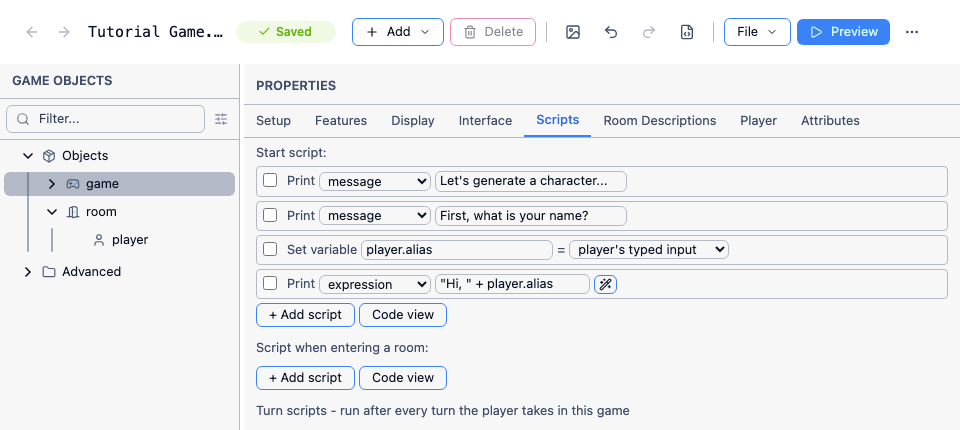
In code view it will look like this:
<start type="script"> msg ("Let's generate a character...") msg ("First, what is your name?") player.alias = GetInput() msg ("Hi, " + player.alias)</start>The important part is the GetInput() function, which suspends the game until the player types something, then returns what they typed as a string. There’s no need to wrap the rest of the script in a block waiting for a callback - execution just continues on the next line once the player has answered, same as any other function call.
If you want to ask several questions, you can just keep adding more lines the same way, for as long as each one is a plain text answer. Where it starts to need blocks within blocks is once you bring in show menu, which - unlike GetInput() - has to wait for the player to click an option, so the code that handles the answer has to go inside its callback block. This is perfectly possible in the GUI view, but starts to get a bit messy once you chain several menus together, so seriously consider doing this in code view.
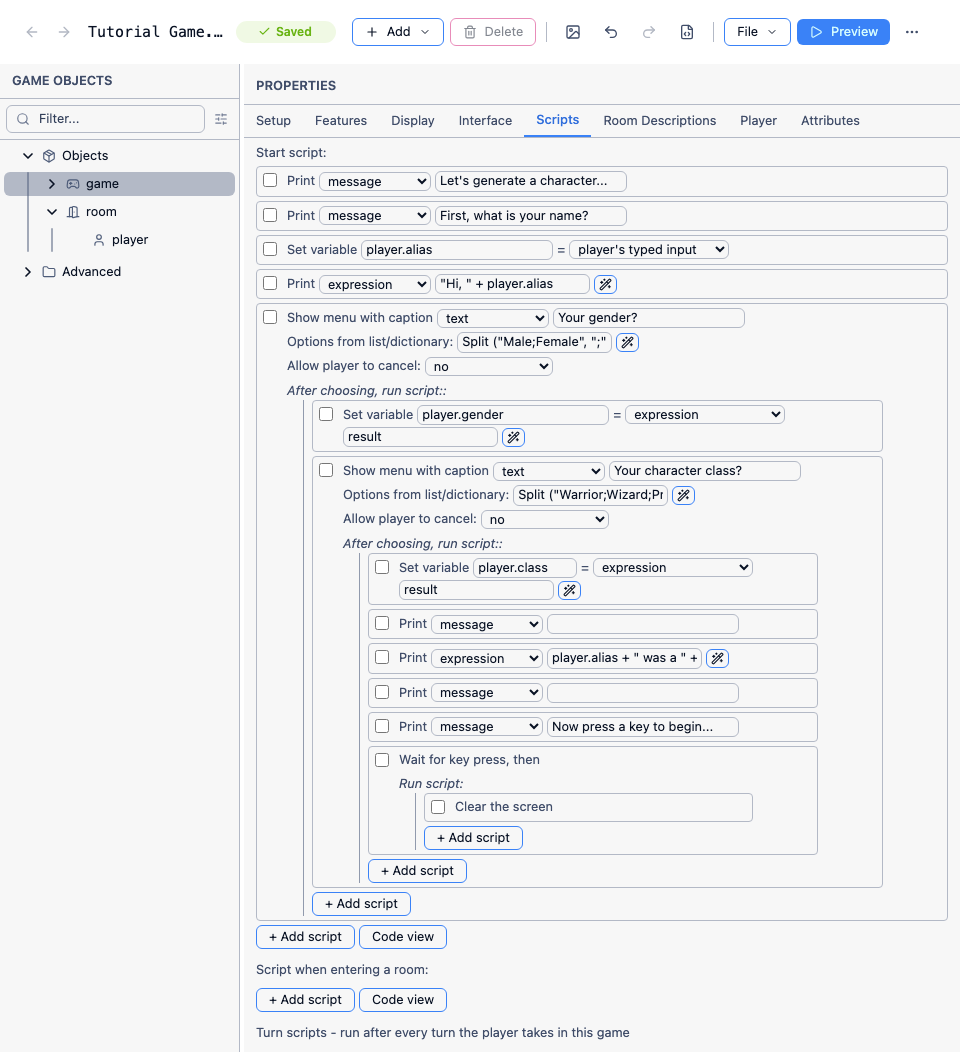
In code view it will look like this:
<start type="script"> msg ("Let's generate a character...") msg ("First, what is your name?") player.alias = GetInput() msg ("Hi, " + player.alias) show menu ("Your gender?", Split ("Male;Female", ";"), false) { player.gender = result show menu ("Your character class?", Split ("Warrior;Wizard;Priest;Thief", ";"), false) { player.class = result msg (" ") msg (player.alias + " was a " + LCase (player.gender) + " " + LCase (player.class) + ".") msg (" ") msg ("Now press a key to begin...") wait { ClearScreen } } }</start>I am using the “show menu” command this time, to limit the player’s choices, in the first instance to either “Male” or “Female”. A menu needs a string list containing the options, and Split gives a quick way to create one:
Split ("Male;Female", ";")The “show menu” command also takes a string, the prompt for the menu, and a Boolean signaling if the player is allowed to click cancel (which we do not want in this case). As before, the result goes into a string variable called “result”.
After also asking for the character class, the screen is cleared. The “wait” command waits until the player presses a key before running its block.
Many questions
Section titled “Many questions”If you want to ask a series of questions, you are better off breaking the process up into functions, one question per function.
As an example, we will ask the same three questions. I suggest naming each function “CharacterCreation” followed by the question name, so we start with “CharacterCreationName”. No parameters or return type.
msg ("Let's generate a character...")msg ("First, what is your name?")player.alias = GetInput()CharacterCreationGenderThen “CharacterCreationGender” - note that the next question depends on the answer given here:
msg ("Hi, " + player.alias)show menu ("Your gender?", Split ("Male;Female", ";"), false) { player.gender = result if (result = "Female") { CharacterCreationClassFemale } else { CharacterCreationClassMale }}Then “CharacterCreationClassFemale”. We can use the result to set attributes of the player and give some clothing too. Note that an attribute you never assign stays completely unset rather than defaulting to zero - it isn’t even blank; using it directly (printing it, doing arithmetic with it, anything beyond comparing it to null) will throw a script error. So give every class a baseline value for each attribute you plan to use, rather than leaving any of them unset:
show menu ("Your character class?", Split ("Amazon;Witch;Priestess;Thief", ";"), false) { player.class = result switch (result) { case ("Amazon") { player.strength = 3 player.agility = 1 fur_bikini.parent = player } case ("Witch") { player.magic = 4 black_robes.parent = player } case ("Priestess") { player.magic = 2 player.agility = 2 white_robes.parent = player } case ("Thief") { player.agility = 4 black_catsuit.parent = player } } CharacterCreationBackground}Then “CharacterCreationClassMale”:
show menu ("Your character class?", Split ("Barbarian;Wizard;Priest;Thief", ";"), false) { player.class = result switch (result) { case ("Barbarian") { player.strength = 4 fur_thong.parent = player } case ("Wizard") { player.magic = 4 black_robes.parent = player } case ("Priest") { player.magic = 2 player.strength = 2 brown_robes.parent = player } case ("Thief") { player.agility = 4 black_catsuit.parent = player } } CharacterCreationBackground}You can easily add further questions in the same manner. Or indeed to insert a new question between two existing one. Just make the previous one point to the new, and have the new one point to the next.
You should consider carefully if you want the player to know what bonuses she will get for each choice. If you decide to do so, she is likely to pick choices that maximise one attribute. On the other hand, if you choose not, she may end up with a mediocre character that is not good at anything.
A creation room
Section titled “A creation room”A useful trick is to start the player in a blank room, with no exits, description or objects. This will prevent the player doing anything until the character creation is over and nothing will be displayed in the panes on the right.
At the end of the creation process, move the player to the start room. This will conveniently trigger the description for that room, setting the scene.
A note about random stats
Section titled “A note about random stats”You may be tempted to generate stats randomly. This is more in keeping with traditional tabletop RPGs, though I think most are moving away from that nowadays, and in any case they still offered a way to reject the worst values or to assign them to attributes as you choose.
There are two big problems with random stats. The first is the player may end up with a terrible character who dies at the first encounter, barely able to swing a sword. The second is the player may end up with an incredible character, able to sweep past any hurdle without breaking a sweat. Then there is the very real temptation for a player to keep generating new characters until she gets one that is great at everything.